Installation of the PC2000
Hardware Installation
For successful installation, there are two parameters that must be set via dip switches
on the PC2000 board: the Base Address and IRQ settings. The default settings for each are:
Base Address (I/O Range) 768 decimal (300 hex)
IRQ (Interrupt Request) 7
There may be other devices in your computer that use these settings. If there is a
conflict with another device in your computer, you must change the settings of the
switches on the PC2000 board under the label SW1. There are 9 switches in all. The Base
Address may be changed via the first 6 switches and the IRQ may be changed via the last 3
switches. See Changing the Settings on page 3 for complete details.
Installation of the PC2000 is similar to that of any PC-to-A/D card installation:
- Turn off the computer and take off the computer cover.
- Ground yourself to the computer chassis or power supply.
- Remove the PC2000 from its static-shielded bag.
- Find an open ISA-bus slot and remove the slot protector.
- Insert the PC2000 into an available expansion slot on the mother board connector by
gently rocking the card into the slot. Make sure the PC2000 is fully seated in the
mother board before screwing the tab on the PC2000 to the computer. Do not bend the PC2000
or move it from side to side once it is seated in the bus slot.
- Reinstall the cover.
- Attach the desired optical fiber to the PC2000’s SMA connector using the included
blue wrench.
Software Installation
Installation with OOIBase (Windows®)
- Insert the OOIBase floppy disk into a drive.
- Select Run and type (drive):setup. Click OK.
- Click OK at the "Welcome!" dialog box.
- Select the Destination Directory. Choose the default destination or type where
you want the software housed. Click OK.
- In the "Make Backups" dialog box, click YES.
- After the software installation is complete, you will go back out to your desktop.
- Start OOIBase by selecting Start | Programs | OOIBase V 1.5 | OOIBase V 1.5.
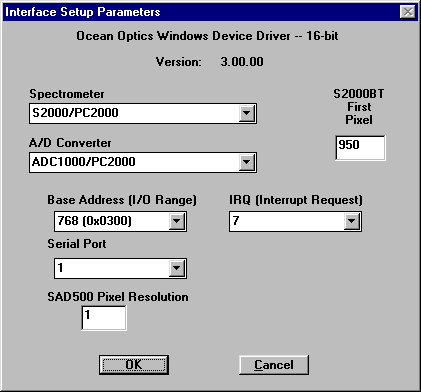
- The "Interface Setup Parameters" dialog box allowing you to specify your
Spectrometer, A/D Converter, Base Address (I/O Range), and IRQ (Interrupt Request) opens.
Only these four parameter options apply to your system. Verify the Spectrometer and A/D
Converter entries match your configuration. For Base Address and IRQ, choose the same
settings as the dip switches on the PC2000 board. If you left them unchanged, accept the
default settings (Base Address of 768 and IRQ of 7). If you changed the dip switches, then
you must select the same settings as those on the PC2000 board. Click OK. You can
always go back to this dialog box by selecting Setup | Configure Hardware.
- If you do not see the "Interface Setup Parameters" dialog box when you start
OOIBase, exit OOIBase by selecting File | Exit. Then select Start | Run,
and type C:\windows\ooidrv.ini. This will
open Notepad and allow you to edit the initialization file for our device driver. Find the
"Initialized" entry within this file. Make sure this line reads: Initialized=0. Save the OOIDRV.INI file and exit
Notepad. Restart OOIBase. You should now see the "Interface Setup Parameters"
dialog box allowing you to specify your hardware configuration.
- At this point, OOIBase (or other Ocean Optics software) should be acquiring data from
your spectrometer. There should be a jumpy trace near the bottom of the displayed spectrum
and that trace should respond to light. If your spectrometer is not responding to light
(or your computer hangs or crashes), please refer to your Quick Start manual included with
your spectrometer or contact our Technical
Support Department.
- Exit and restart OOIBase. This enables the hardware changes to take effect.
Changing the Settings
Change the Base Address or the IRQ setting on the PC2000 board under the bank of dip
switches labeled SW1. The Base Address is set through the first 6 dip switches and the IRQ
is set through the last 3 dip switches. Reinstall the card and change the software
settings to match the hardware settings (see the appropriate software section for
instructions).
Base Address Settings
Switches in the OFF position have the decimal values shown. Switches in the ON position
have a value of zero. The Base Address is the sum of the values of the switches. In the
default setting, switches 5 and 6 are added to give a total of 768. A few combinations for
Base Address settings follow.
Example: 768 decimal = Hex300 = 0x300 (Default Setting)
Switch # |
1 |
2 |
3 |
4 |
5 |
6 |
on |
XXX |
XXX |
XXX |
XXX |
|
|
off |
|
|
|
|
XXX |
XXX |
| |
Decimal equivalent |
16 |
32 |
64 |
128 |
256 |
512 |
Value as shown |
|
|
|
|
256 |
512 |
Example: 784 decimal = Hex310 = 0x310
Switch # |
1 |
2 |
3 |
4 |
5 |
6 |
on |
|
XXX |
XXX |
XXX |
|
|
off |
XXX |
|
|
|
XXX |
XXX |
| |
Value as shown |
16 |
|
|
|
256 |
512 |
Example: 800 decimal = Hex320 = 0x320
Switch # |
1 |
2 |
3 |
4 |
5 |
6 |
on |
XXX |
|
XXX |
XXX |
|
|
off |
|
XXX |
|
|
XXX |
XXX |
| |
Value as shown |
|
32 |
|
|
256 |
512 |
Example: 816 decimal = Hex330 = 0x330
Switch # |
1 |
2 |
3 |
4 |
5 |
6 |
on |
|
|
XXX |
XXX |
|
|
off |
XXX |
XXX |
|
|
XXX |
XXX |
| |
Value as shown |
16 |
32 |
|
|
256 |
512 |
IRQ Interrupt Request Settings
The following matrix defines the different Interrupt Request settings by switch
positions 7, 8, and 9. In the default setting, the IRQ is set to 7. Combinations for IRQ
settings follow.
IRQ 7 (Default Setting)
Switch # |
7 |
8 |
9 |
on |
XXX |
XXX |
|
off |
|
|
XXX |
IRQ 3
Switch # |
7 |
8 |
9 |
on |
|
|
|
off |
XXX |
XXX |
XXX |
IRQ 4
Switch # |
7 |
8 |
9 |
on |
XXX |
|
|
off |
|
XXX |
XXX |
IRQ 5
Switch # |
7 |
8 |
9 |
on |
|
XXX |
|
off |
XXX |
|
XXX |
IRQ 9
Switch # |
7 |
8 |
9 |
on |
|
|
XXX |
off |
XXX |
XXX |
|
IRQ 10
Switch # |
7 |
8 |
9 |
on |
XXX |
|
XXX |
off |
|
XXX |
|
IRQ 11
Switch # |
7 |
8 |
9 |
on |
|
XXX |
XXX |
off |
XXX |
|
For more information, visit the Ocean Optics web site at: www.oceanoptics.com
| 